MQTTfy:mqtt ble automation Android app
Unified MQTT & Bluetooth(BLE) Dashboard Automation
The power to control and automate your entire IoT ecosystem, right from your pocket. Download now from the Google Play Store.

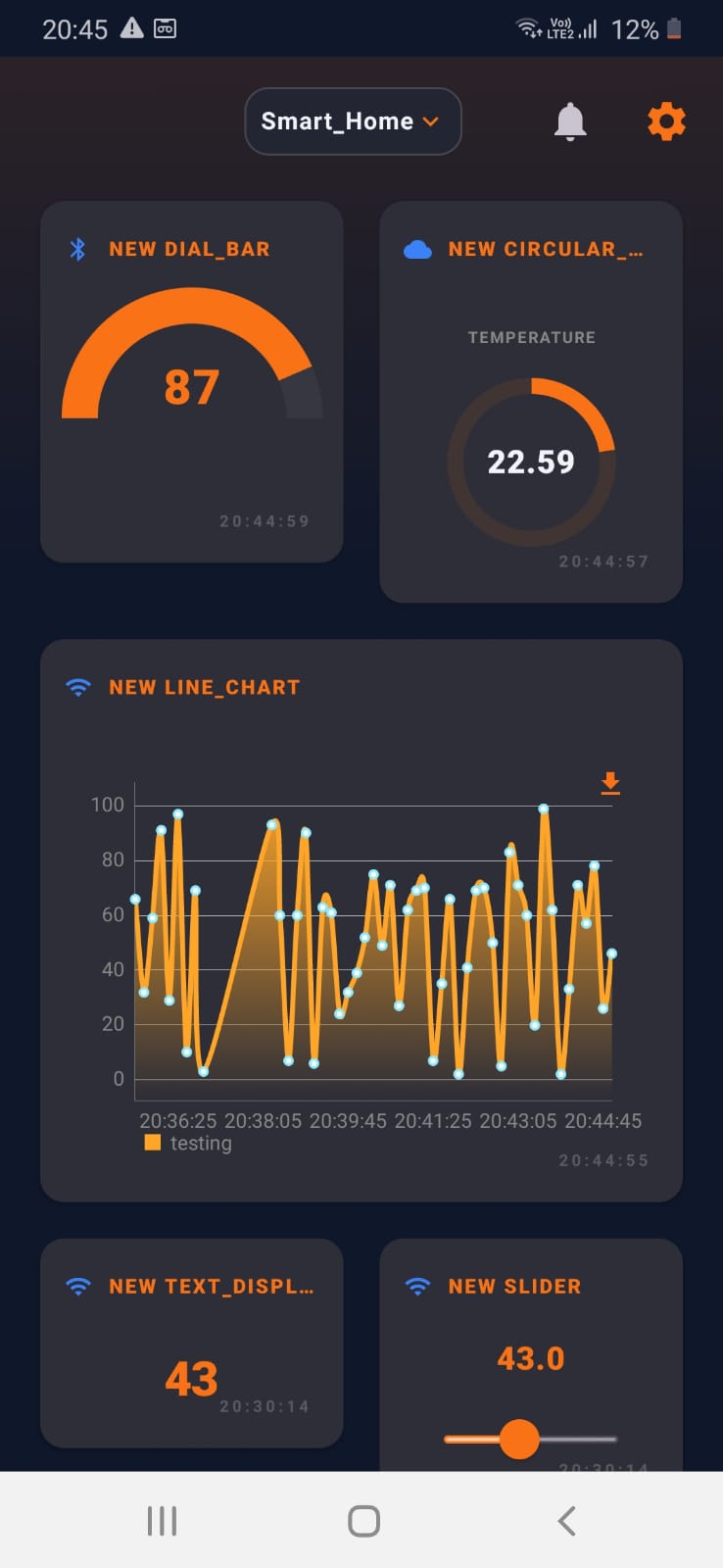
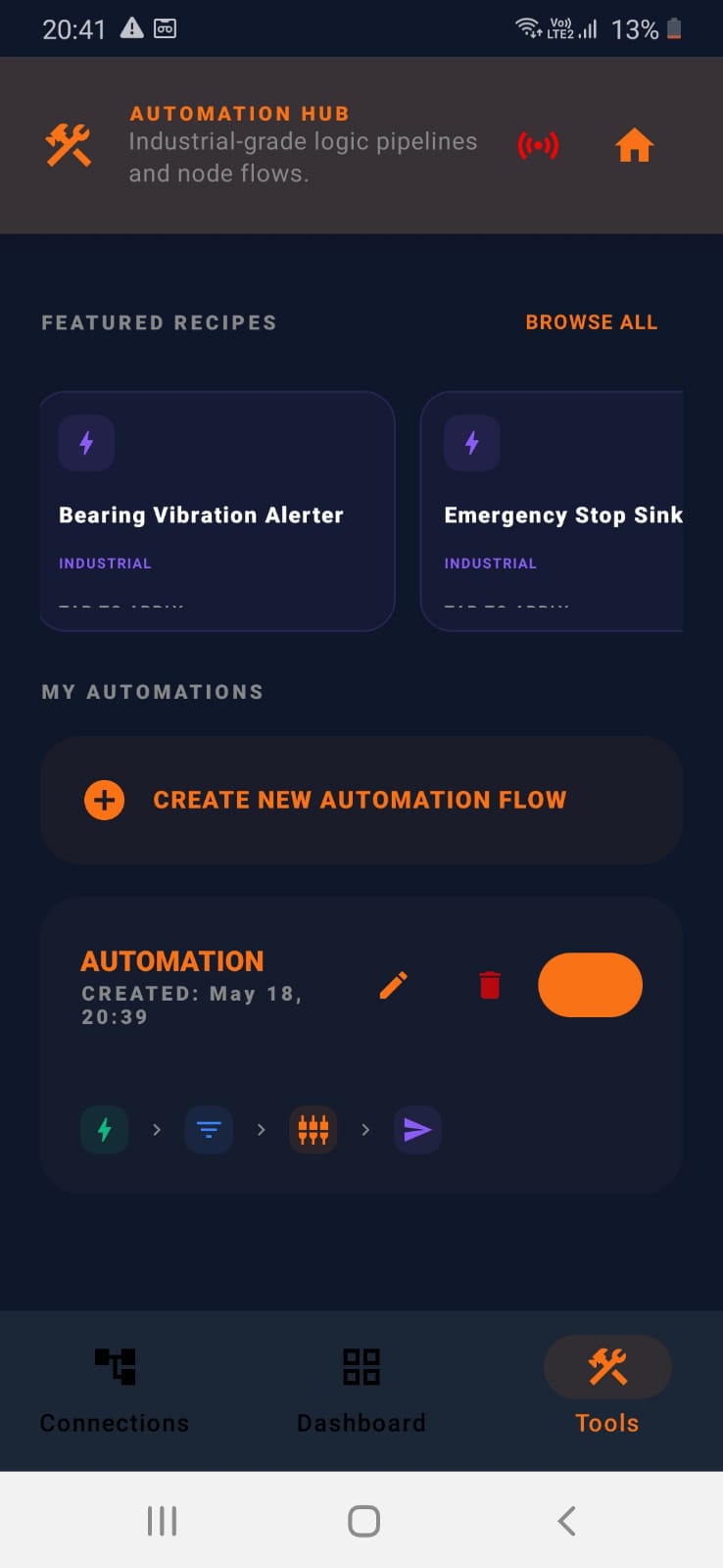
One App. Multiple Protocols. Limitless Automation.
Our native Android application is meticulously designed for seamless control and monitoring. Create stunning custom dashboards, build powerful automations, and connect all your devices, whether they speak MQTT, Bluetooth Low Energy (BLE), or use REST APIs.
For the Hobbyist
Perfect for your smart home projects and DIY IoT experiments.
For the Professional
Reliable and robust for industrial IoT (IIoT) monitoring and control.
Developer Friendly
Utilize flexible REST API clients and protocol handlers for complex integrations.
The Three Core Pillars of Mqttfy
Explore the fundamental features that make Mqttfy a complete, pocket-sized IoT platform for monitoring, management, and automation.
1. Connection Manager
Your multi-protocol hub. Connect to BLE, MQTT, and REST APIs simultaneously, with full offline support for maximum privacy.
Key Features
- Offline & Online Flexibility: Connect to local BLE sensors, MQTT brokers, and REST APIs without needing an internet connection.
- Simultaneous Multi-Protocol: Manage connections to multiple protocols at the same time without dropping a payload.
- Total Data Privacy: Keep your sensitive telemetry data completely off the internet by operating on your local network.
Visualize
2. Dashboard Designer
Bring your data to life. Mix widgets from multiple MQTT brokers, BLE devices, and REST APIs on a single, unified dashboard.
Key Features
- Massive Widget Library: Use text panels, sliders, gauges, charts, and more to build your perfect UI on our MQTT Dashboard.
- On-Device AI & Alarms: Run real-time analytics locally and configure critical push notifications so you never miss an event. (Powered by Offline AI).
- Advanced Data Extraction: Pinpoint exact values with JSON Paths and MQTT topics, or use custom Javascript to transform data on the fly.
3. Automation Hub
Automate your world. Build intelligent, no-code automations that run silently and reliably in the background.
Key Features
- No-Code Automation Chains: Use an intuitive wizard to build complex logic flows that trigger based on your data.
- Powerful Action Nodes: Send automated emails, push alerts to Slack and Telegram, or trigger custom webhooks.
- 100% Offline Automation Safety: Guarantee maximum security by running your logic pipelines entirely offline, with no data sent to the cloud.
Getting Started in 3 Easy Steps
1
Connect
Go to the Connections tab to add your first MQTT broker, API, or BLE device.
2
Visualize
Switch to the Dashboard tab and add a widget to see your data live.
3
Automate
Open the Tools tab to build intelligent, automated background tasks.
*Need a refresher? Replay the in-app tutorial from the System Settings & Summary menu on the Connection screen.*
Features: The Future of Offline IoT Automation
Welcome to the feature breakdown for MQTTfy—the ultimate unified IoT dashboard and edge-automation hub. Unlike traditional smart home apps that rely on expensive cloud subscriptions and send your private data to third-party servers, MQTTfy is built on a 100% Offline-First Architecture.
Explore how we are bringing industrial-grade automation and On-Device AI directly to your smartphone.
1. Private, On-Device AI
Your data is your business. Keep it that way.
MQTTfy pioneers the use of Local AI for smart home and industrial automation. By running Large Language Models (LLMs) directly on the edge, you get unparalleled privacy and zero latency.
- •On-Device LLM Inference: Run powerful models like Gemma 2B directly on your smartphone's processor without an internet connection.
- •Local Network AI (BYOK): Connect MQTTfy to your own high-powered local AI servers running Ollama, LM Studio, or Phi-3 Mini.
- •Zero Cloud Dependency: Your sensor telemetry, camera feeds, and automation logic never leave your local network. True air-gapped security.
2. Agentic Chat Automation
Don't code your smart home. Just talk to it.
Why write complex IFTTT scripts or Node-RED logic when you can just tell your house what to do?
- •Conversational Rule Building: Simply type, "Turn on the AC in the Living Room when the temperature goes above 25°C," and the MQTTfy AI Agent will instantly generate the logic nodes for you.
- •Context-Aware Diagnostics: The AI Agent reads your live sensor data locally to help you troubleshoot offline ESP32 nodes or failing MQTT payloads.
- •On-Device RAG: (Retrieval-Augmented Generation) The AI learns the context of your specific dashboard setup to provide hyper-personalized control.
3. The Unified IoT Hub
One dashboard to rule them all.
Stop switching between five different apps to control your hardware. MQTTfy unifies the holy trinity of IoT protocols into a single, seamless interface.
- •Advanced MQTT Client: Connect to any broker (Mosquitto, Synapse Agentic Broker, HiveMQ). Full support for wildcards, QoS levels, and retained messages.
- •Bluetooth Low Energy (BLE): Discover, pair, and read/write to BLE characteristics instantly. Perfect for debugging custom ESP32 and Arduino wearables.
- •REST API Integration: Pull telemetry from any web endpoint or trigger webhooks directly from your dashboard nodes.
4. Visual Automation Builder
Industrial-grade logic, built with your fingertips.
You don't need a Raspberry Pi hub or an external server to run complex automation rules. The automation engine lives directly inside your phone.
- •Drag-and-Drop Nodes: Chain together triggers, condition gates, and actions visually.
- •Continuous Background Execution: Your automation rules keep running reliably in the background, constantly monitoring your sensors even when the app is minimized.
- •Complex Thresholds: Set up multi-variable rules (e.g., "IF Motion Detected AND Lux < 10 THEN Publish MQTT Payload").
5. SCADA-Lite Widgets
Visualize your telemetry like a professional.
Mix and match data from MQTT, BLE, and REST on the exact same dashboard.
- •Rich Widget Library: Line charts, interactive radial gauges, toggles, sliders, and historical telemetry plotting.
- •Camera & Image Comparison: Stream local RTSP feeds or compare "Before/After" image payloads directly on your dashboard.
- •Custom Layouts: Flexible grid controls to build professional, tablet-ready interfaces for factory floors or smart homes.
6. Enterprise-Grade Security
Built for makers, engineered for industry.
- •Hardware-Backed Encryption: Your broker credentials and API keys are secured using Android's encrypted Keystore.
- •No Telemetry Tracking: We do not track your usage, read your payloads, or sell your data. You are the sole owner of your ecosystem.
The Future of Automation: Local Offline AI Agents for IoT
Welcome to the absolute pinnacle of smart infrastructure management. The MQTTfy Android application is not just a standard control panel; it is a revolutionary unified ecosystem designed to empower you with local offline AI agents. Whether you are an enthusiast building intricate smart homes or an industrial engineer deploying robust IIoT (Industrial IoT) solutions, our platform bridges the gap between complex hardware and intelligent, autonomous decision-making. By leveraging state-of-the-art local offline RAG (Retrieval-Augmented Generation) directly on your Android device, we guarantee that your sensitive telemetry data never leaves your secure local network unless you explicitly instruct it to.
We understand the critical importance of privacy and latency in modern automation. By processing data locally, our AI agent for IoT on Android ensures instantaneous responses to environmental changes. Imagine an autonomous system that monitors your factory floor or home environment, analyzes patterns without a cloud connection, and executes actions flawlessly. This is the reality we have built with our AI automation with local AI and hybrid cloud AIs capabilities.
Unifying MQTT, BLE, and REST Dashboards
Historically, managing disparate IoT protocols required juggling multiple applications. You needed one app to act as an MQTT client, another for your Bluetooth BLE GATT client needs, and yet another to handle HTTP webhooks. MQTTfy shatters these silos by offering fully integrated MQTT BLE REST dashboards. This means you can visualize the temperature from an ESP32 over Wi-Fi, the proximity data from a BLE beacon, and weather data from a REST API—all on the exact same screen.
Our integrated BLE scanner dashboard automatically detects nearby Bluetooth Low Energy devices, allowing you to instantly map their characteristics and descriptors to visual widgets. When combined with our robust MQTT broker integration, the application transforms your mobile device into a centralized command center. You can publish control payloads to Arduino microcontrollers or subscribe to massive data streams from a Raspberry Pi fleet, monitoring everything in real-time.
Empowering Creators with No-Code Visual Automation
The true power of an IIoT AI agent lies in its accessibility. We have democratized complex logic programming through our proprietary no code visual automation engine. You no longer need to write hundreds of lines of Python or C++ to create intelligent conditional triggers. Using a highly intuitive, drag-and-drop interface, you can construct logic pipelines that react dynamically to your IoT environment.
- Condition-Based Triggers: Tell your Arduino to activate a relay when a specific BLE sensor crosses a temperature threshold.
- AI-Driven Thresholds: Allow your local offline AI agents to dynamically adjust setpoints based on historical usage patterns, entirely on-device.
- Multi-Protocol Bridges: Create a rule that listens for an MQTT message from an ESP32, processes it, and forwards it to a REST endpoint or a Bluetooth peripheral automatically.
Hardware Mastery: ESP32, Arduino, and Raspberry Pi
Hardware compatibility is the cornerstone of any successful IoT deployment. Our Android ecosystem is meticulously optimized to interface seamlessly with the world's most popular microcontrollers and single-board computers.
ESP32 & Wireless Dominance
The ESP32 is the undisputed champion of Wi-Fi and Bluetooth convergence. By acting as a highly efficient MQTT client, the ESP32 can continuously stream sensor data to the MQTTfy app. Conversely, you can use our Bluetooth BLE GATT client to configure ESP32 settings offline securely.
Arduino: The Prototyping Powerhouse
For countless makers, Arduino remains the foundation of physical computing. Whether you are using an Arduino Uno with an Ethernet shield or a modern MKR board, our platform ingests their data streams flawlessly, turning raw serial outputs into beautiful, actionable MQTT BLE REST dashboards.
Raspberry Pi: The Edge Computing Core
When deploying an IIoT AI agent, edge computing power is necessary. A Raspberry Pi running a local MQTT broker (like Mosquitto) pairs perfectly with our Android app. The app connects to the Pi, retrieves vast amounts of stored telemetry via local offline RAG, and presents it in a digestible format for the end-user.
Transforming Smart Homes and Industrial Environments
The scalability of MQTTfy ensures that it is just as effective in a residential setting as it is on a factory floor. For smart homes, the platform acts as an invisible, intelligent butler. Your AI agent for IoT on Android learns your routines, adjusting lighting, HVAC systems, and security protocols based on local presence detection and historical data.
In the industrial sector, downtime is catastrophically expensive. Our IIoT AI agent capabilities provide predictive maintenance alerts by continuously analyzing vibration and temperature data from legacy machinery retrofitted with ESP32 or Arduino sensors. Because the intelligence is powered by local offline AI agents, factory managers are assured that proprietary production metrics never leak to public cloud AIs.
The Unmatched Security of Local Offline RAG
Retrieval-Augmented Generation (RAG) is revolutionizing how AI understands contextual data, but traditionally, it required sending massive datasets to remote servers. MQTTfy introduces true local offline RAG to the mobile IoT space. By indexing your local MQTT payloads and BLE sensor logs directly on your Android device's storage, our embedded AI can answer complex queries (e.g., "What was the average temperature of Node A last Tuesday?") without ever establishing an outbound internet connection. This paradigm shift guarantees absolute data sovereignty, making it the only viable choice for high-security deployments.